
GitHub Recon

GitHub is a developer platform that allows developers to create, store, manage and share their code. GitHub is an excellent place for pentesters to look for leaked source code, credentials and other sensitive information.
GitHub Reconnaissance
Discovering Leaked Data
Searching GitHub for sensitive data such as usernames, passwords, secrets, keys and even sensitive application source code can be invaluable to a penetration tester. Leaked sensitive data can be used to help pentest a target’s externally exposed attack surface as well as the internal environment when internal systems and applications are leaked to GitHub. Exposed secrets, keys and passwords often lead to breaches of systems and applications.
Creating a GitHub account and a personal access token will let you use cURL to query the GitHub search API.
# Search GitHub repositories for web.config files containing the words 'password' and '.com'
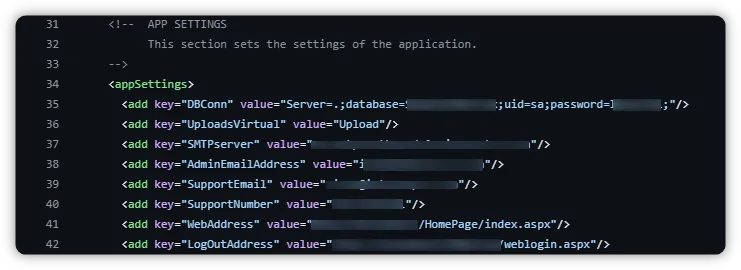
curl -L \ -H "Accept: application/vnd.github.v3+json" \ -H "Authorization: Bearer github_pat_.........." \ -H "X-GitHub-Api-Version: 2022-11-28" \ "https://api.github.com/search/code?q=filename:web.config%20password%20.com&per_page=10&page=1"An example of the above cURL command gave me several web.config files, containing the keywords password and .com, that leak sensitive information such as SA account database credentials.
A gittyleaks is another great CLI tool to use for GitHub-sensitive data searching. It can be found here: https://github.com/kootenpv/gittyleaks
gittyleaks -link https://github.com/projectdiscovery/httpx.git -d # Clones a GitHub repo and searches for sensitive data and then deletes the repo once donegittyleaks -link https://github.com/projectdiscovery/httpx.git -d --find-anything # Finds anything remotely suspiciousAnother excellent tool is github-secrets.py from the github-search collection of tools found here: https://github.com/gwen001/github-search. This tool takes a search parameter, such as a target domain, searches GitHub for all files containing the keyword, and then scans the discovered files for any sensitive secrets.
python3 ./github-secrets.py -s "hacker.com" -t github_pat_.... # Searches for secrets in all files containing the specified keyword. Replace -t with your GitHub tokenTruffleHog is a tool dedicated to discovering credentials in Git repositories. It can be downloaded from here: https://github.com/trufflesecurity/trufflehog/releases
./trufflehog git https://github.com/xxxxxx/xxx.git # Scans for and lists all sensitive secrets and credentials in the given repository
GitHub Monitoring
Monitoring GitHub for Leaked Data
Continuously monitoring GitHub for sensitive data during the time frame of an engagement can open new doors. Often target organization’s developers push updates or new repositories during an engagement and often leak secrets and sensitive data that can unlock new doors while pentesting.
gitGraber is an excellent tool for this and can be described as a tool that monitors GitHub to search and find sensitive data in real-time. You can find it here: https://github.com/hisxo/gitGraber
python3 gitGraber.py -k ./wordlists/keywords.txt -q "@hacker.com" # Monitor GitHub to search and find sensitive data for the specified domain using the builtin keywords fileThe tool requires you to add your GitHub API key to the config.py file. The repo includes a good keywords file to use.


