

Field Reports
Weak MSSQL Server Credentials

Field Report: From Weak SQL Credentials to Full System Access
Sometimes, you prepare for a complex exploit chain only to find the front door is already unlocked. In this report, I break down a critical finding from a recent internal penetration test where a single guessable Microsoft SQL password provided access to a sensitive production database and, ultimately, full control over the underlying host.
Discovery: Finding High Risk Ports and Services, aka “Low-Hanging Fruit”
During the internal reconnaissance phase, I was poking around the internal network when I spotted an MSSQL instance running on 10.19.13.61 on a non-standard port 62583. My main go-to for internal ports and services scanning is Nmap and RunZero. It is always a good idea to use more than one tool or technique in discovery, as combined results can often include things that the other misses. For a comprehensive cheat sheet on both, click here for Nmap and here for RunZero.
These are the commands I used in this instance:
sudo ./runzero-scanner-linux-amd64.bin 10.19.0.0/16 -r 10000 --tcp-ports 1-65535 -o pentest
sudo nmap -sTCV -Pn -p- 10.19.0.0/16 -oX pentest.xml
MSSQL is always a high-value target to investigate in an internal penetration test due to the service often running under the LocalSystem or a Domain Admin account to avoid permission “headaches” during installation. If an attacker gains sa (system administrator) rights within the SQL engine, they can often use features like xp_cmdshell to execute commands directly on the Windows OS. Because the service is running as a high-privileged account, command execution isn’t “sandboxed.” The attacker inherits Local Admin or SYSTEM privileges on the box.

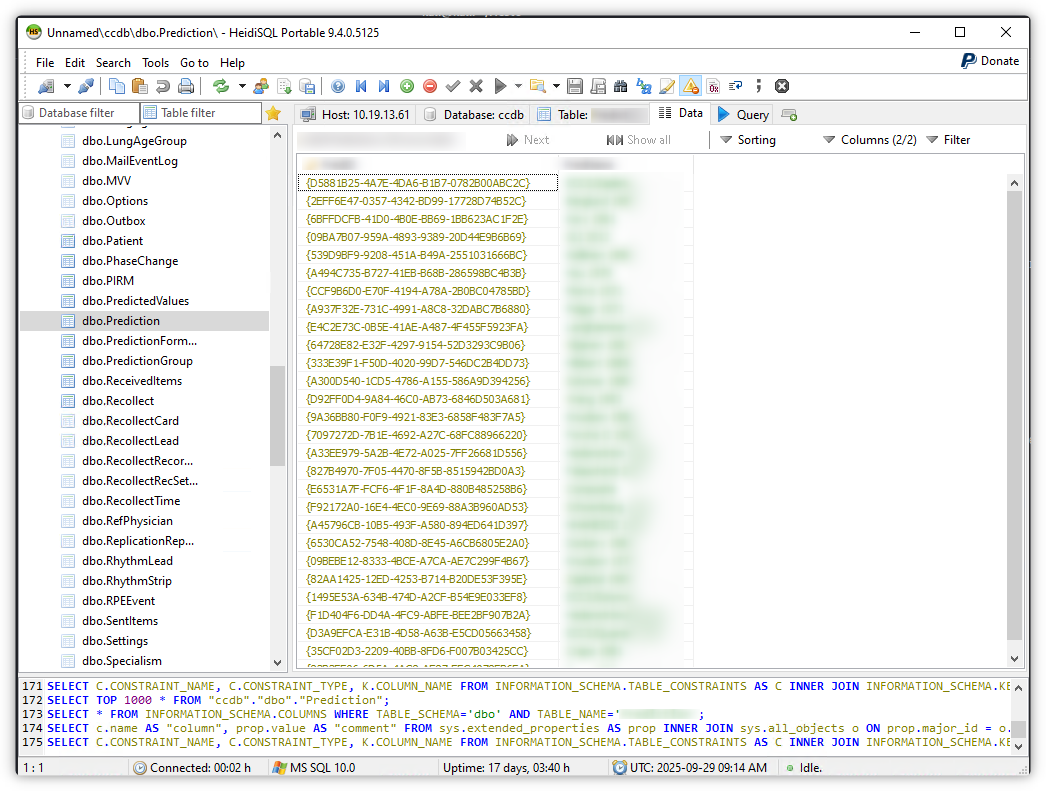
As can be seen in the screenshot above, Hydra identified that the credential pair admin:admin was valid. To test if the credentials are indeed valid, I make a connection to the database, and to do this, I use the portable version of HeidiSQL. There are several CLI tools available as well, but in my experience, HeidiSQL is easy to use, connects to many different database types and lets you view database contents easily.
Impact: Database Access
Using HeidiSQL, I confirmed that the credentials were valid and successfully connected to the database. Without even pivoting to the underlying server, this is a critical risk to the company, as anybody connected to the network (even non-domain users) can obtain access to the database, which contains medical records and Personally Identifiable Information (PII).
Bonus: Privilege Escalation
During my post-exploitation check, I looked at the permissions assigned to the admin user account. I discovered that the SQL service was running with system-level access on the host server. This misconfiguration turned a database breach into a full server compromise. By exploiting the database’s high-level permissions, an attacker could potentially move laterally through the rest of the network, using this server as a pivot point.
To confirm the foothold on the underlying server, I targeted the MSSQL instance at 10.19.13.61 on the non-standard port (62538) to see if those admin:admin credentials actually had any privileges. To do this, I used the popular NetExec tool. You can find a comprehensive cheat sheet for it here.
This is the command I used in this instance:
netexec mssql <target> -u 'admin' -p 'admin' --port 62583 --local-auth
Note the –local-auth, this tells NetExec to authenticate using the local database account rather than a Windows/Domain account.

The green (Pwn3d!) in the output is the “holy grail” for a pentester as it confirms that not only are the credentials valid, but the account has administrative privileges.
Remediation
To prevent a similar chain of vulnerabilities, I recommend the following:
- Enforce Password Complexity: Align all database accounts with the organisational password policy and make sure the password policy itself is strong. If it’s easy for a pentester to guess, it’s easy for an attacker to find. Replace all weak passwords.
- The Principle of Least Privilege: Database accounts should never run with SYSTEM or Domain Admin privileges. They should only have the bare minimum permissions to function.
- Administrator Education: As with almost all misconfiguration findings, ensure that DBAs (and all staff) understand the risks of “default” or “test” credentials being used in a production environment. Educate DBAs not to utilise weak passwords when creating accounts.


